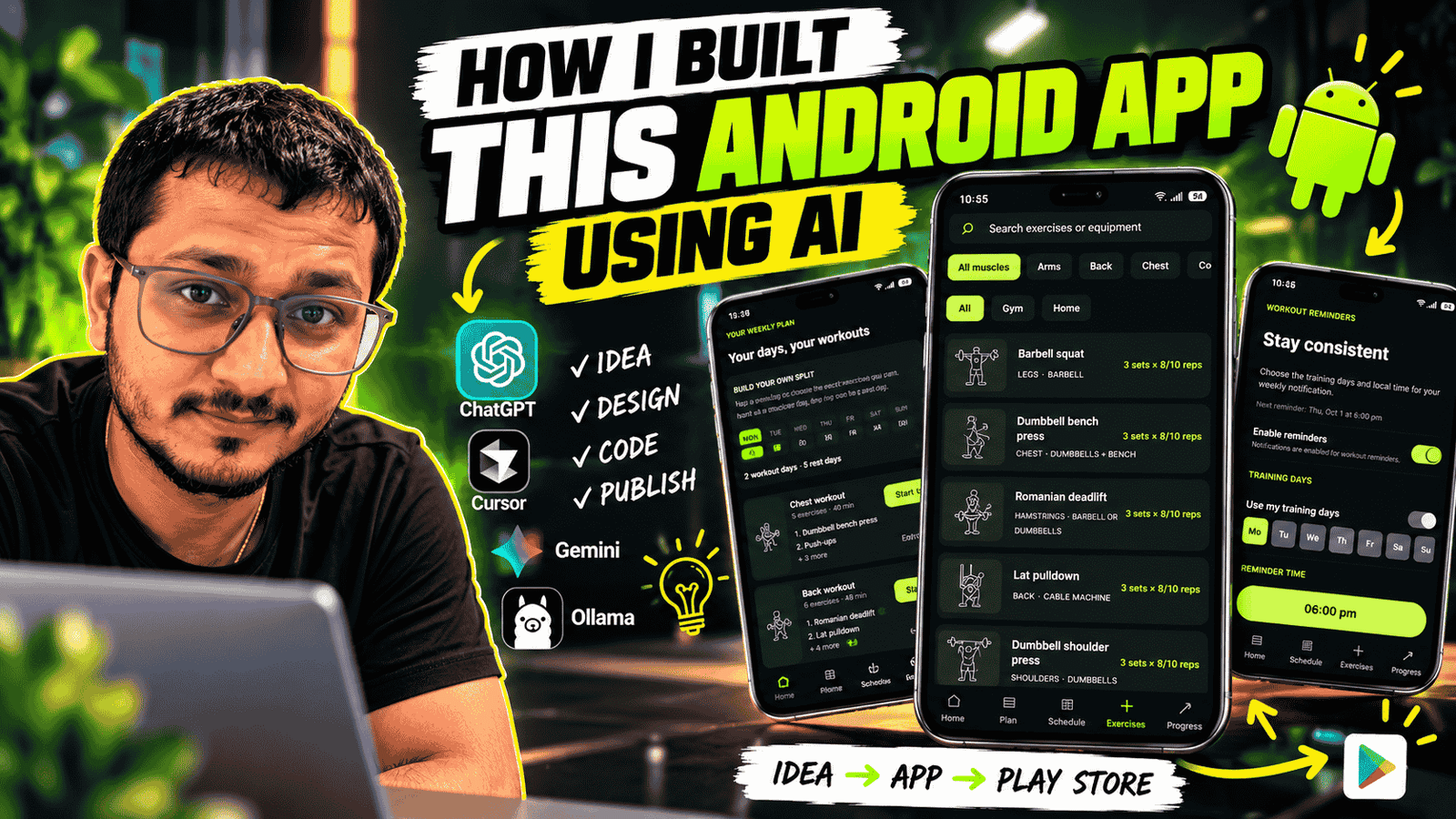
Building an Android app used to mean spending a long time moving between design tools, documentation, code examples, and debugging sessions. AI has changed that process. For my Gym Guide: Workout Planner project, I used AI throughout development to help turn a fitness-app idea into a working Android application—with workout planning, exercise browsing, progress tracking, reminders, and more.
In this article, I’ll explain what Gym Guide does, the technologies behind it, how AI helped me build it, and what I learned along the way. AI accelerated the work, but the process still required clear requirements, testing, and decisions about how the app should behave.
What is Gym Guide: Workout Planner?
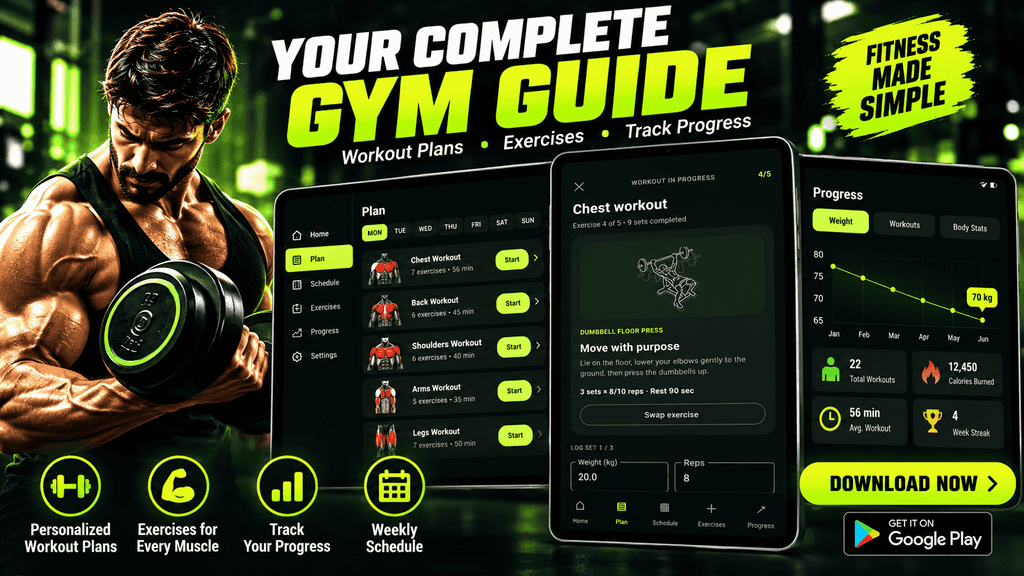
Gym Guide is an Android workout planner designed to help users organize training and keep track of their fitness routine. Rather than treating workouts as a simple list, the app brings planning, training, history, and progress features together in one place.
The app includes onboarding and a fitness profile, personalized workout plans, a weekly schedule, an exercise library, active workout logging, workout history, progress views, body measurements, diet-plan screens, readiness check-ins, and configurable workout reminders. It also includes data backup and restore flows, Google sign-in support, privacy and consent handling, analytics, and advertising integrations.
The goal was to make a practical companion for everyday gym training—not to replace a qualified trainer, dietitian, or medical professional. Fitness and diet suggestions should be treated as general guidance and adapted to each person’s needs.
The Technology Behind the Android App: Kotlin and Jetpack Compose
Gym Guide is built for Android with Kotlin. Its interface uses Jetpack Compose, Android’s declarative UI toolkit. Instead of describing a screen as a hierarchy of XML views, Compose lets the app describe UI in Kotlin based on the current state.
That approach works well for an app with interactive screens: a workout can move from plan to active session to completion, while history and progress screens reflect saved data. Compose also made it easier to build reusable UI components and keep the app’s visual style consistent.
State, business logic, and local data
The app uses a ViewModel to coordinate screen state and workout actions, with domain models and calculation logic separated from much of the UI. A repository backed by SharedPreferences handles several locally stored workout and profile data flows. Keeping workout information available on-device is useful for a gym environment where connectivity may be unreliable.
The project also contains dedicated codecs for important data formats, including workout history and backups. Separating encoding and decoding logic makes those operations easier to test than mixing them into screen code.
Firebase and Android integrations
The project is configured for Firebase and includes Firebase Authentication and Analytics integrations. Firebase Cloud Messaging (FCM) support is also implemented: the app retrieves and stores an FCM registration token, handles token refreshes, and can display incoming notification messages using an Android notification channel.
Push notification delivery has an important server-side requirement. The app can receive FCM messages, but sending targeted messages reliably requires a trusted backend to associate tokens with users and send notifications through Firebase. An FCM token is not a secret to embed in a public sender or use as a substitute for server authorization.
The app also integrates Google sign-in related libraries, Google Mobile Ads, and the User Messaging Platform for consent flows. These integrations require correct Firebase and ad-service configuration, as well as appropriate privacy disclosures and permission handling.
How I Used AI to Build Gym Guide
Turning the idea into a feature list
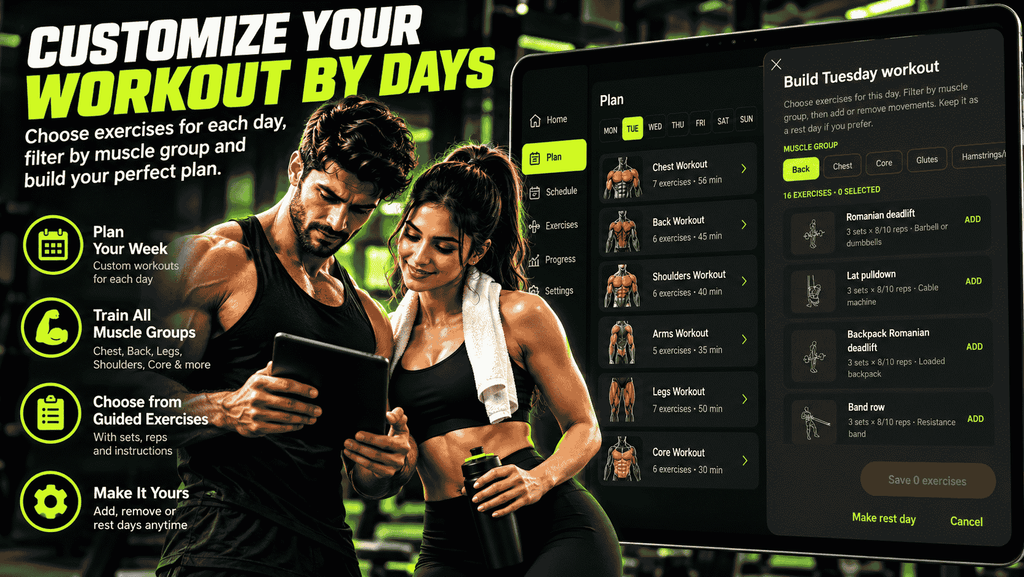
I started with the central problem: people need a convenient way to plan workouts and see what they have completed. AI helped me expand that idea into a structured feature set—onboarding, workout plans, a schedule, active workout logging, history, progress, reminders, and profile settings.
Breaking the project into features made the work more manageable. Instead of asking AI for an entire app in one step, I could focus on one screen or behavior at a time and keep each change connected to the product goal.
Generating and refining the interface
AI assisted with the Compose implementation and with developing reusable UI patterns. For example, workout cards, dialogs, form controls, and screen sections benefit from a consistent structure. I could describe a desired interaction, review the generated approach, then refine it to fit the app’s existing state and styling.
A useful lesson was to treat generated UI as a starting point, not a final design. The result still needs to be checked for readable text, sensible navigation, appropriate empty states, accessibility, and behavior on different screen sizes.
Building the workout logic incrementally
The most important parts of a fitness planner are not only its screens; the app must also preserve user progress and handle real workout flows. AI helped develop and refine models and logic for plans, exercise substitutions, workout sessions, readiness check-ins, weekly schedules, and progress summaries.
I approached these pieces incrementally. A small, testable calculation or codec is easier to verify than a large feature built as one block. Unit tests help catch regressions in areas such as workout history, backup data, recommendations, schedule calculations, and other domain behavior.
Integrating Android and Firebase features
AI also helped with Android platform tasks, including runtime notification permission handling and notification channels. For push notifications, the app needs to handle both notification payloads and data payloads, and it must account for Android notification permission behavior on newer versions of Android.
Firebase configuration is specific to the Android application ID and Firebase project. The Google Services configuration file must match the app package, and the Firebase Messaging dependency and service registration must be present. Even with AI assistance, these details need to be verified through a Gradle sync, a build, and testing on a device.
Testing, debugging, and improving
AI can propose code quickly, but compilation and tests provide essential feedback. I used the build and test workflow to catch integration problems, resolve issues, and confirm that existing behavior continued to work after changes.
For example, after adding Firebase Cloud Messaging support, the debug build completed successfully and the unit test suite passed. That does not replace testing notification delivery on a real configured device, but it verifies that the project compiles and that the existing unit tests remain green.
What Made AI-Assisted Android Development Useful?
AI was most useful as a development partner for speeding up repetitive work and helping me explore implementation options. It can draft Kotlin code, explain unfamiliar Android APIs, suggest test cases, and help trace build errors. That lets a solo developer spend more time evaluating product behavior and less time starting every implementation from a blank page.
The biggest gains came from working in small iterations:
1. Describe one feature and its expected behavior.
2. Inspect the existing project structure before changing it.
3. Implement a focused change that follows the app’s patterns.
4. Build and run relevant tests.
5. Review the result and refine anything that does not meet the requirement.
This workflow is more dependable than asking an AI tool to generate a complete production app in one response.
Challenges and Lessons Learned
AI-generated code still needs engineering review
Generated code can misunderstand requirements, make assumptions about dependencies, or overlook lifecycle, permissions, privacy, and error states. I treated AI output as a proposal. I checked how it fit the existing architecture and used builds and tests to validate changes.
Protecting user data and privacy
A fitness app can handle sensitive personal information. Data collection, analytics, advertising, sign-in, backups, and push tokens all deserve careful review. The app should request permissions only when needed, explain relevant data use clearly, and avoid placing private credentials or server keys in the Android client.
Push notifications require more than client code
Adding an FCM receiver is only one part of a complete notification system. The user must grant notification permission where required, the app needs an appropriate notification channel, and a trusted server is needed for authenticated, targeted delivery. This separation is important for both reliability and security.
The Result: A More Complete Fitness Companion
Gym Guide brings together the main tools a user might need to plan and review training: a personalized plan, weekly schedule, exercise library, workout logging, history, progress tracking, measurements, and reminders. Backup and restore support helps users manage their data, while Firebase and other Android integrations provide a foundation for sign-in, analytics, and notifications.
Most importantly, the project demonstrates how AI can help one developer build a substantial Android application by working feature by feature. The result did not come from a single prompt; it came from defining the product, iterating on code, checking behavior, and testing the implementation.
Conclusion
Building Gym Guide showed me that AI can make Android development faster and more approachable. With Kotlin, Jetpack Compose, a clear feature plan, and an iterative workflow, I was able to develop a fitness app that covers workout planning, tracking, progress, reminders, and supporting integrations.
AI did not remove the need for engineering judgment. I still had to decide what the app should do, review the generated code, handle Android and Firebase requirements, and verify changes with builds and tests. Used that way, AI is a powerful tool for turning an idea into a real app—and for helping developers keep learning as they build.
If you are planning to build an Android app using AI, start with a focused problem, break the product into small features, and validate each step. That is the approach I used to bring Gym Guide from an idea to a working Android fitness planner.
Frequently Asked Questions
Can AI build a complete Android app?
AI can assist with planning, code generation, debugging, documentation, and tests, but a complete app still needs human direction, integration work, privacy decisions, and verification. AI is most effective when used iteratively alongside the Android development tools.
What technologies does Gym Guide use?
Gym Guide is an Android app built with Kotlin and Jetpack Compose. It also uses Android architecture and UI libraries, local storage for app data, Firebase services, notification APIs, and integrations for sign-in, analytics, advertising, and consent.
Does Gym Guide send push notifications from Firebase automatically?
The app includes FCM client support for receiving messages and managing its registration token. Production push sending—especially targeted or personalized delivery—requires a trusted backend or another secure server-side sender configured for the Firebase project.
Is Gym Guide a replacement for a personal trainer or dietitian?
No. The app is a workout planning and tracking tool. Its general fitness or diet-related features should not be treated as medical advice or as a replacement for guidance from qualified professionals.