Hi Guys, Welcome to Proto Coders Point.
In this flutter tutorial, we will implement a count down timer in flutter application using Timer Class of dart language.
Note: In this tutorial, we will cover 2 ways to implement count down timer flutter.
- Count-down timer using setState() to update Timer Value.
- Count-down timer using Getx StateManagement to update Timer Value.
If you are android developer, I have written a tutorial with source code for implementing count down timer in android app.
How we will use Timer Class in flutter
We are going to make use of dart Timer Class with periodic function to implement CountDownTimer. A Timer Class can we used to make count down in flutter app.
use a periodic timer to repeatedly loop in same interval time. Inside Timer.periodic set a fixed interval duration so that a loop runs exactly at a duration as defined.
Example: Snippet code
Timer _timer = Timer.periodic(Duration(seconds: 1), (timer) {

   // The Inner Block works Exactly after every 1 second as defined.

   // You can perform  variable count down here

   // Important, you need to Stop the Timer loop when you want to end it Eg: when value = 0
   _timer.cancel(); // will stop it

    });
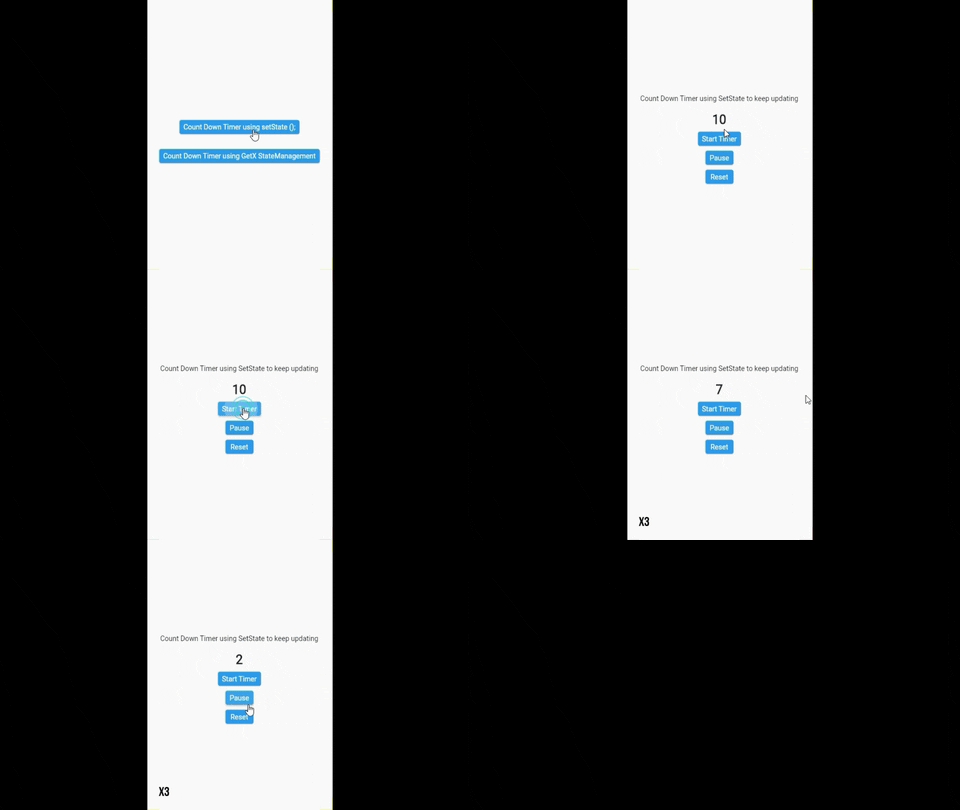
1. Implementation of Count Down Timer using setState to update the Timer Value
Video Tutorial
main.dart
import 'dart:async';

import 'package:flutter/material.dart';
import 'package:flutter_timer/ByGetXStatemanagement.dart';
import 'package:flutter_timer/BySetState.dart';
import 'package:flutter_timer/CountDownTimerState.dart';
import 'package:get/get.dart';

void main() {
  runApp(MyApp());
}

class MyApp extends StatelessWidget {
  // This widget is the root of your application.
  @override
  Widget build(BuildContext context) {
    return GetMaterialApp(
      title: 'Flutter Demo',
      theme: ThemeData(
        primarySwatch: Colors.blue,
      ),
      home: MyHomePage(),
    );
  }
}

class MyHomePage extends StatefulWidget {
  @override
  _MyHomePageState createState() => _MyHomePageState();
}

class _MyHomePageState extends State<MyHomePage> {
  @override
  Widget build(BuildContext context) {
    return Scaffold(
      body: Center(
        child: Column(
          mainAxisAlignment: MainAxisAlignment.center,
          children: [
            SizedBox(
              height: 10,
            ),
            ElevatedButton(
                onPressed: () {
                  Navigator.push(context,
                      MaterialPageRoute(builder: (build) => BySetState()));
                },
                child: Text('Count Down Timer using setState ();')),
            SizedBox(
              height: 30,
            ),
            ElevatedButton(
                onPressed: () {
                  Navigator.push(
                      context,
                      MaterialPageRoute(
                          builder: (build) => ByGetXStateManagement()));
                },
                child: Text('Count Down Timer using GetX StateManagement')),
          ],
        ),
      ),
    );
  }
}
BySetState.dart
import 'dart:async';

import 'package:flutter/material.dart';

class BySetState extends StatefulWidget {
  @override
  _BySetStateState createState() => _BySetStateState();
}

class _BySetStateState extends State<BySetState> {
  int _counter = 10;
  late Timer _timer;

  void _startTimer() {
    _counter = 10;
    _timer = Timer.periodic(Duration(seconds: 1), (timer) {
      if (_counter > 0) {
        setState(() {
          _counter--;
        });
      } else {
        _timer.cancel();
      }
    });
  }

  @override
  Widget build(BuildContext context) {
    return Scaffold(
      body: Center(
        child: Column(
          mainAxisAlignment: MainAxisAlignment.center,
          children: [
            Text('Count Down Timer using SetState to keep updating'),
            SizedBox(
              height: 20,
            ),
            Text(
              '$_counter',
              style: TextStyle(fontSize: 25, fontWeight: FontWeight.bold),
            ),
            SizedBox(
              height: 10,
            ),
            ElevatedButton(
                onPressed: () {
                  _startTimer();
                },
                child: Text('Start Timer')),
            SizedBox(
              height: 10,
            ),
            ElevatedButton(
                onPressed: () {
                  _timer.cancel();
                },
                child: Text('Pause')),
            SizedBox(
              height: 10,
            ),
            ElevatedButton(
                onPressed: () {
                  setState(() {
                    _timer.cancel();
                    _counter = 10;
                  });
                },
                child: Text('Reset'))
          ],
        ),
      ),
    );
  }
}
2. Implementing Count down timer using GetX StateManagement to update Timer Value
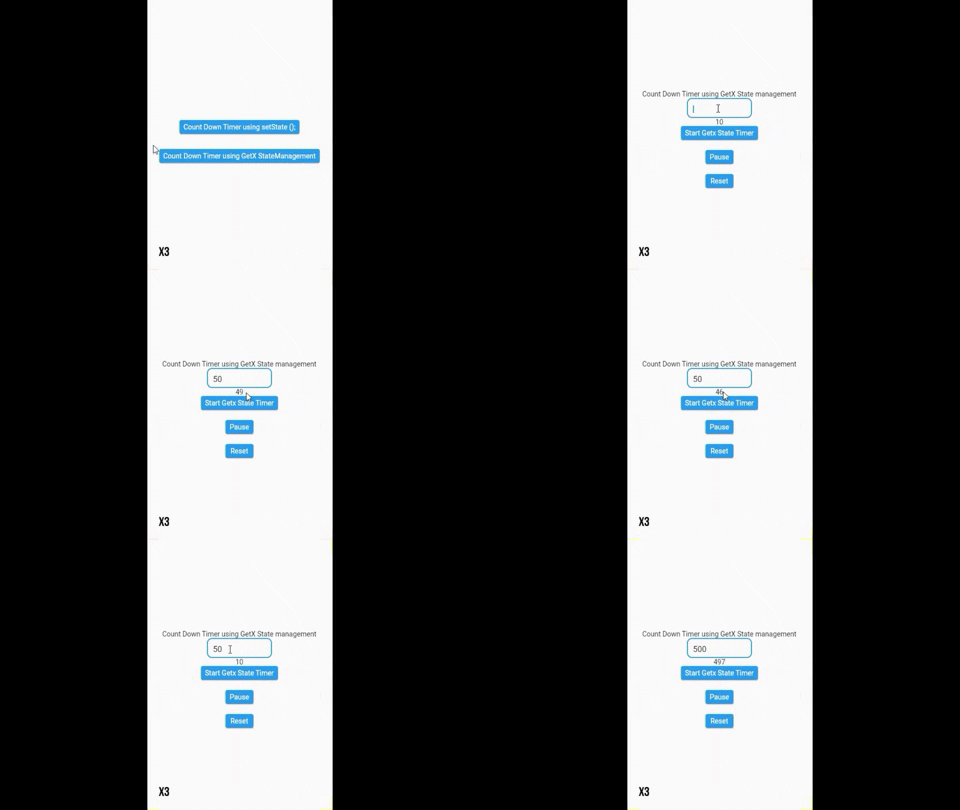
Video Tutorial (GetX State Management Example by implementing Count Down Timer)
#Soon
Create a Statemanagement dart class ‘CountDownTimerState.dart’.
CountDownTimerState.dart
import 'dart:async';
import 'package:get/get.dart';

class CountDownTimerState extends GetxController{
  // Initial Count Timer value

  var SCount = 10;

  //object for Timer Class
  late Timer _timer;

  // a Method to start the Count Down
  void StateTimerStart(){
     //Timer Loop will execute every 1 second, until it reach 0
    // once counter value become 0, we store the timer using _timer.cancel()

    _timer = Timer.periodic(Duration(seconds: 1), (timer) {

      if(SCount > 0){
        SCount--;
        update();
      }else{
        _timer.cancel();
      }
    });
  }

  // user can set count down seconds, from TextField
  void setnumber(var num){

        SCount = int.parse(num);
        update();

  }

  // pause the timer
  void Pause(){
    _timer.cancel();
    update();
  }

  // reset count value to 10
  void reset(){
    _timer.cancel();
    SCount = 10 ;
    update();
  }

}
ByGetXStatemanagement.dart
import 'package:flutter/material.dart';
import 'package:flutter_timer/CountDownTimerState.dart';
import 'package:get/get.dart';

class ByGetXStateManagement extends StatefulWidget {
  @override
  _ByGetXStateManagementState createState() => _ByGetXStateManagementState();
}

class _ByGetXStateManagementState extends State<ByGetXStateManagement> {
  final CountDownTimerState TimerState = Get.put(CountDownTimerState());

  final _textEditingController = TextEditingController();

  @override
  void initState() {
    _textEditingController
        .addListener(() => TimerState.setnumber(_textEditingController.text));
  }

  @override
  Widget build(BuildContext context) {
    return Scaffold(
      body: Center(
        child: Column(
          mainAxisAlignment: MainAxisAlignment.center,
          children: [
            Text('Count Down Timer using GetX State management'),
            SizedBox(
                height: 40,
                width: 130,
                child: TextField(
                  controller: _textEditingController,
                  minLines: 1,
                  keyboardType: TextInputType.number,
                  decoration: InputDecoration(
                      border: OutlineInputBorder(
                          borderRadius: BorderRadius.all(Radius.circular(10)))),
                )),
            GetBuilder<CountDownTimerState>(
                builder: (_) => Text('${TimerState.SCount}')),
            ElevatedButton(
                onPressed: () {
                  TimerState.StateTimerStart();
                },
                child: Text('Start Getx State Timer')),
            SizedBox(
              height: 20,
            ),
            ElevatedButton(
              onPressed: () {
                TimerState.Pause();
              },
              child: Text('Pause'),
            ),
            SizedBox(
              height: 20,
            ),
            ElevatedButton(
              onPressed: () {
                TimerState.reset();
              },
              child: Text('Reset'),
            ),
          ],
        ),
      ),
    );
  }
}
Recommended Flutter Tutorial Articles
Flutter Provider – State management